

Mazda has always led the automotive industry with class-leading technology in its vehicles, and 2024 is no exception. As your local Mazda dealer, we’re here to help you make the most of your incredible onboard Mazda infotainment system.
Mastering Your Mazda Infotainment System With Your Favorite Mazda Dealer
Communication
Hands-Free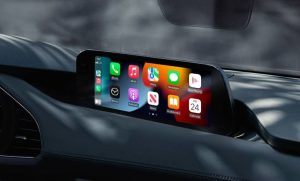
Integrated Bluetooth connectivity allows you to make or receive calls without taking your device out of your pocket. You can make calls using your call history, favorites, or by dialing the number with the onboard voice-recognition software. You can press the talk/pick-up button to activate voice recognition, use the hang-up button to end the call, and toggle the volume adjustment buttons while on the call.
Imported Contacts
You can choose to download a phone book directly to your Mazda, either automatically through Bluetooth device connection or manually, by going to your “Communication” screen, selecting “Contacts,” and choosing “Update Contacts.” Mazda can save up to 1,000 contacts to your vehicle.
Texting
When your device is connected, your Mazda can display any texts you receive on your center display, and your vehicle will read them out to you. You can choose from several preset replies to safely respond to missed calls or texts without taking your hands off the wheel.
Entertainment
Device Link
In addition to Bluetooth, your Mazda can include a USB port capable of reading a memory stick or device, and even an HDMI port for connecting video players to your center display.
Internet Radio
This module includes Pandora, SiriusXM, HD Radio, and AM/FM radio.
Music
If you use the USB port to connect your device, the onboard Gracenote program will display your music tags, including the artist name, song title, and album name.
Information
Fuel Efficiency
This monitor allows you to see your fuel-efficiency history, your active energy-flow monitor, and your Mazda’s efficiency settings. You can find this information on your Mazda’s home-screen “Information” application.
Owner’s Manual
Your vehicle has hundreds of different warning lights, so Mazda includes a digital owner’s manual to help you understand your Mazda’s needs.
Vehicle Status
You can access this monitor through the “Information” application and customize what warnings you see. The display categories include “Next Service,” “Maintenance Details,” and “Vehicle Maintenance Settings.”
Navigation
The 3D gyroscope sensor makes the navigation map much easier to understand, especially when traversing dense cities. The available Active Driving Display projects your current navigation onto the front windshield.
You can search for your destination by typing in its name, pinpointing it using nearby landmarks, or choosing from your 50 favorite saved locations.
Smartphone Integration
Apple CarPlay and Android Auto allow you to use your smartphone to search up your destination, listen to music, send/receive texts, and even command Siri/Google using your voice.
By mastering your Mazda’s infotainment features, every drive becomes more connected, enjoyable, and convenient. Start exploring these capabilities today with us at Alan Webb Mazda in Vancouver, WA, and we’ll help you make the most of your Mazda’s class-leading technology.
Connect with us


- June 2026
- May 2026
- April 2026
- March 2026
- January 2026
- December 2025
- November 2025
- October 2025
- September 2025
- August 2025
- July 2025
- June 2025
- May 2025
- April 2025
- March 2025
- February 2025
- January 2025
- December 2024
- November 2024
- October 2024
- September 2024
- August 2024
- July 2024
- June 2024
- May 2024
- April 2024
- March 2024
- February 2024
- January 2024
Archives
- 2024 Mazda CX-30 Vancouver, WA
- 2024 Mazda CX-5 Vancouver, WA
- 2024 Mazda CX-50 Vancouver, WA
- 2024 Mazda CX-90 PHEV Vancouver, WA
- 2024 Mazda CX-90 Vancouver, WA
- 2024 Mazda Lineup
- 2024 Mazda MX-5 Miata RF Vancouver, WA
- 2024 Mazda3 Hatchback Vancouver, WA
- 2024 Mazda3 Sedan Vancouver, WA
- 2025 Mazda CX-30 Vancouver, WA
- 2025 Mazda CX-5 Vancouver, WA
- 2025 Mazda CX-50 Hybrid Vancouver, WA
- 2025 Mazda CX-50 Vancouver, WA
- 2025 Mazda CX-70 Plug-In Hybrid Vancouver, WA
- 2025 Mazda CX-70 Vancouver, WA
- 2025 Mazda CX-90
- 2025 Mazda CX-90 PHEV Vancouver, WA
- 2025 Mazda CX-90 Vancouver, WA
- 2025 Mazda Lineup
- 2025 Mazda MX-5 Miata Vancouver, WA
- 2025 Mazda3 Sedan Vancouver, WA
- 2026 Mazda CX-30
- 2026 Mazda CX-5 Vancouver, WA
- 2026 Mazda CX-50 Hybrid Vancouver, WA
- 2026 Mazda CX-90 Vancouver, WA
- 2026 Mazda Lineup
- 2026 Mazda3 Hatchback
- AC Maintenance for Your Car Vancouver, WA
- Alan Webb Mazda
- Alan Webb Mazda Service
- Battery Maintenance
- Brake Inspection
- Brake Service
- Car Loans
- CX-50 Trim Levels
- Get Pre Approved
- Mazda Financing
- Mazda Financing Vancouver, WA
- Mazda SUVs
- Tire Service
- Trade-In Your Car
- Transmission Repair Service
- Uncategorized
- Vancouver Mazda Dealer
- Vancouver Mazda Service
- Vancouver Used Cars